The companion article, Benchmarking MOOS-IvP Skills, examines 440 runs with and without the plugin, including completion, engineering conformance, and the limits of the comparison.
A note for readers: MOOS-IvP is an open-source collection of C++ modules for building autonomy systems on robotic platforms, particularly autonomous marine vehicles. This article assumes familiarity with MOOS communities, applications, helm behaviors, and missions; readers who need that background can start with the official MOOS-IvP site.
Agentic coding tools turn a chat interface into a development environment. They can inspect a repository, edit files, run builds and tests, and use the results to guide their next action. This makes them far more useful than a code-suggestion model—and gives their mistakes real reach.
They can compress routine engineering work, carry context across a repository, and make unfamiliar systems easier to navigate. But an agent that misreads a local convention can propagate that error through source files, launch scripts, tests, and documentation.
MOOS-IvP makes this tension especially visible. A useful agent must do more
than produce plausible C++. It needs to understand where an application belongs
in a community, how a behavior is built and discovered by pHelmIvP, how
launcher arguments reach generated targets, which variables cross the
vehicle–shoreside boundary, and what a particular validation step actually
proves. Many failures are structurally convincing: the source compiles, the
templates expand, or the shell command exits successfully, while the complete
mission still does not behave as intended. Worse, subtle mistakes can go
unnoticed and become examples the agent reuses in later iterations.
Accuracy and scale
For this project, the problem reduces to two goals: accuracy and scalability.
Accuracy means giving the agent enough domain knowledge to make correct
decisions. It should know the roles of applications and behaviors, understand
their configuration surfaces, preserve established launcher and networking
patterns, and recognize when a claim needs to be checked against the MIT
manuals, the local source tree, or runtime logs. It should also understand the
limits of its evidence. A successful build proves that the code compiles; it
does not prove that pAntler can launch the process, that pHelmIvP can load
the behavior, or that the communities can exchange the expected variables.
Scalability means making that expertise reusable. The same conventions should not have to be reconstructed from scratch every time an agent creates an application, adds a behavior, or assembles a mission. They should be available across projects and agents, with consistent build patterns, validation standards, and ownership boundaries.
Neither goal works alone. Accuracy without scalability produces careful but bespoke assistance. Scalability without accuracy reproduces mistakes faster. The MOOS-IvP Skills plugin is an attempt to provide both: a reusable procedural layer that helps a coding agent work within the MOOS-IvP ecosystem with more consistent judgment.
What a skill contains
“Skills” are a broadly supported pattern in agentic coding systems. The basic idea is close to the way we describe a human capability: a skill gives an agent specialized guidance for a recognizable class of work. In this plugin, those capabilities include building a MOOS application, creating an IvP behavior, assembling a mission, consulting upstream documentation, and analyzing an existing log file, among other tasks.
On disk, each skill is packaged as a folder built around a primary SKILL.md
file. A typical package looks like this:
skill-name/
├── SKILL.md
├── references/   # optional
├── scripts/      # optional
└── assets/       # optional
The name and description in SKILL.md help the agent recognize when the
workflow applies. The body records the decisions, sequence, boundaries, and
validation requirements for carrying out the work. A skill may be selected
automatically from the task or invoked explicitly by name.
The optional subfolders keep supporting material beside that primary workflow:
references/preserves detailed conventions, examples, and design rationale without overloadingSKILL.md.scripts/turns important checks and operations into repeatable tools instead of asking the agent to reproduce them from prose.assets/carries baseline missions, templates, or helpers that should be copied and adapted rather than regenerated from memory.
App Builder is a representative example. Its primary instructions define the application-development workflow, but its references go further into CMake wiring, AppCasting structure, and useful upstream examples. The skill therefore contains both procedural guidance and the supporting material needed to apply that guidance consistently. It is closer to a small engineering playbook than to a single reusable prompt.
One connected system
The plugin currently packages ten skills together, with more expected as the project matures. Each addresses a distinct part of the MOOS-IvP developer experience, but they are designed to hand work and evidence to one another.
Mission Builder, for example, can use MOOS-IvP Docs to confirm an uncertain application or behavior parameter before writing configuration. Once the mission is running, ALog Analysis can inspect runtime evidence that static configuration checks could not provide. If the mission needs new software, App Builder or Behavior Builder creates it before Mission Builder integrates it into the appropriate community or helm configuration.
The evaluation tools make the layering even more explicit. Eval Mission Builder
starts with an ordinary mission rather than replacing it. It adds headless
startup, a mission-owned grade, results.txt, and a completion contract while
preserving the mission’s normal operator-facing path. Harness Builder then
takes a working self-evaluating mission and runs it across isolated cases,
ports, patches, and parallel workers. Each layer depends on a sound layer
beneath it.
In the plugin’s architecture diagram, an arrow represents one of these direct handoffs: a skill calling another skill for work or evidence it does not own. The graph is not intended to turn every task into one giant workflow. Its purpose is to keep responsibilities clear while still allowing a larger job to move naturally between specialized capabilities.
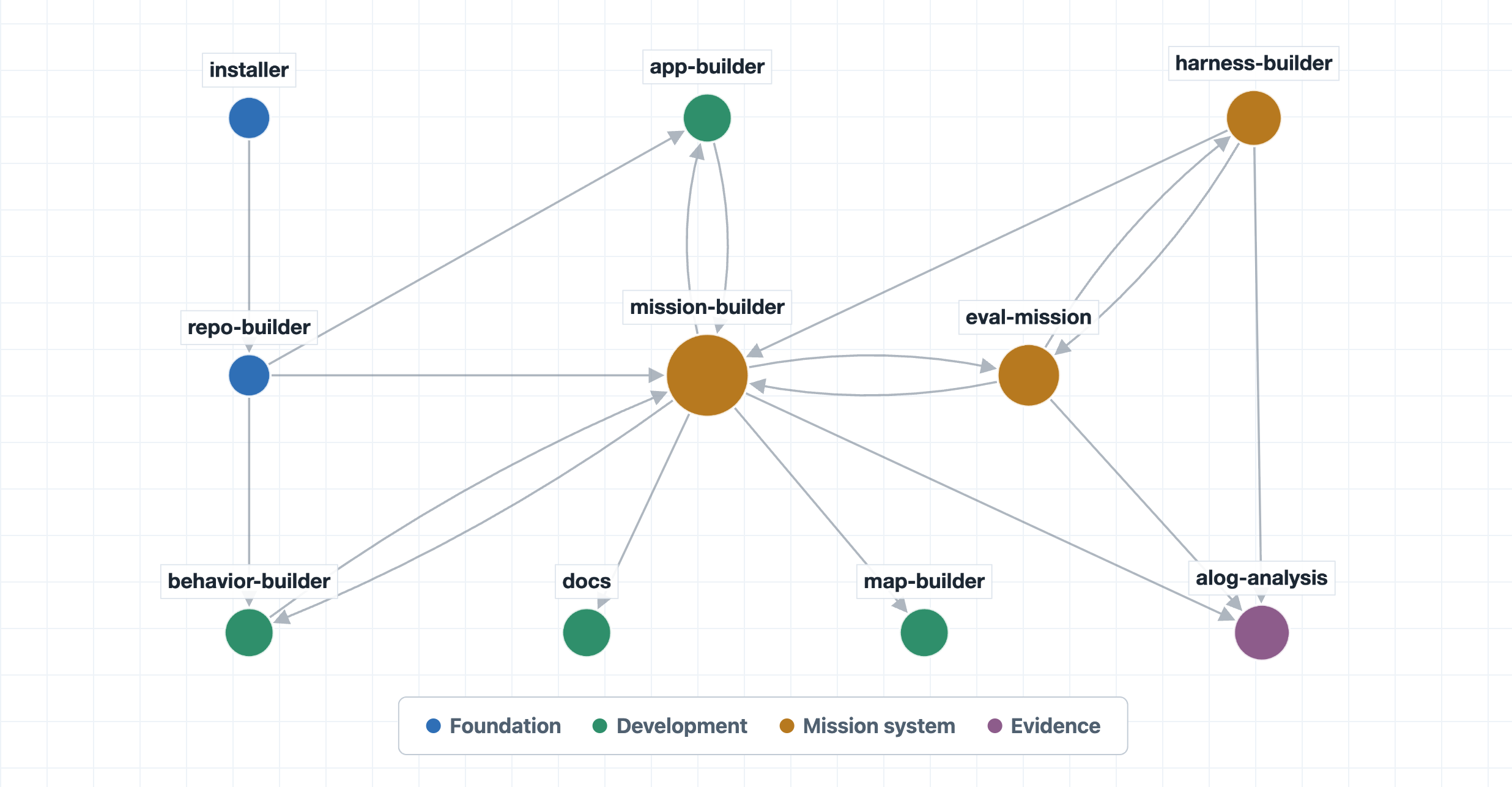
All ten skills are distributed as one plugin for installation. That makes the full system available together, while still allowing the agent to load only the guidance relevant to the current task.
What follows
The remainder of this article examines the ten skills individually, then returns to two system-level questions: how work is divided between them and how an individual workflow can be customized. A separate section explains how the skills are developed and validated through isolated testing and feedback from real projects. The article closes by examining several of those projects in practice.
Individual skills
The plugin currently contains ten specialized workflows. Select a skill to expand its full description, including its workflow, validation approach, supporting files, and relationships with the rest of the system.
Mission Builder
Full profileWorkflow, validation, support files, and related skills
Canonical source: skills/moos-ivp-mission-builder/
Definition
Mission Builder builds or repairs the ordinary mission layer for one standalone MOOS-IvP scenario. It produces a complete mission folder with launchers, vehicle and shoreside communities, helm behavior configuration, networking, target-generation support, viewer setup, cleanup, and operator documentation. The completed mission should remain readable and runnable on its own.
The expected result is more than a valid collection of .moos and .bhv
files. The mission should have a clear human-facing entry point, correctly
separated community responsibilities, reproducible generated targets,
appropriate graphical and headless modes, conservative cleanup, and a
validation path that matches the claims being made about the mission.
Workflow
The skill begins by resolving the mission architecture: the number of vehicles, simulation or hardware operation, the community layout, graphical or headless requirements, and any custom application or behavior integration. These choices determine the launcher arguments, application roster, network routes, helm configuration, viewer setup, and the evidence required to validate the result.
Mission Builder then selects the closest proven baseline, adapts its communities and launchers, adds only the applications and behaviors needed for the scenario, and generates the target files. Structural inspection and generated-target checks come before a live launch. Operator documentation and cleanup are treated as part of the completed mission rather than follow-up work.
Baselines
Mission Builder bundles complete single- and two-vehicle baseline missions and adapts the closest one rather than rebuilding the launcher system. These baselines provide tested argument forwarding, target generation, networking, and GUI/headless behavior, leaving the agent to make only mission-specific changes.
Launchers
The launchers in both bundled baselines establish the same hierarchy. The
top-level launch.sh is the operator-facing entry point and owns the single
interactive uMAC session. Vehicle and shoreside launchers each generate and
start one community; top-level calls pass --auto so sublaunchers do not open
competing sessions or block automated runs.
Validation
Validation is layered. Structural checks verify the mission layout;
generated-target checks confirm that arguments such as ports and addresses
reach the final files; live execution tests binaries, application
configuration, behaviors, and communication. A successful --just_make proves
target generation, not runtime correctness.
Networking
Caller-controlled MOOSDB and pShare ports are forwarded through every launcher layer so missions can run concurrently and validation can use fresh ports. The skill keeps three network concepts separate:
ServerHost = localhosttells applications where to find their community’s local MOOSDB.- The launcher
--ipvalue becomespHostInfo.default_hostip_force, which advertises the address representing that host to other communities. - The vehicle’s
--shorevalue controls the route used by the vehicle broker to reach shoreside.
Using the advertised host address as ServerHost can send local applications
to the wrong interface; host identity and the shoreside route are separate
settings.
Configuration
The skill uses strict, forced nsplug generation and supports companion
overlay files, sometimes called sidecars. Files such as .moosx and .bhvx
sit beside the base templates and let later workflows patch configuration
without rewriting the originals. Launchable applications belong in
ProcessConfig = ANTLER; standalone application blocks do not start processes.
Direct configuration is preferred for small missions, with plug files used
only for real shared duplication.
Documentation and cleanup
The README records the scenario, important files, run commands, and operator
actions. clean.sh removes generated files and logs without global process
kills. Grading, case matrices, batch execution, and result aggregation remain
outside the ordinary mission layer.
Common faults
--just_makeconfirms target generation but cannot expose every runtime failure.- Port options may be parsed correctly yet dropped before reaching
nsplug; generated targets must be inspected. --ipadvertises host identity throughpHostInfo; it is not the local MOOSDB address or the vehicle’s shoreside route.- Missing
--autoforwarding can open multipleuMACsessions and block automation. - Non-strict template generation can leave unresolved macros in target files, while broad cleanup commands can hide lifecycle defects and terminate unrelated missions.
Assets
assets/baseline-single-vehicle/
A portable one-vehicle mission scaffold with one vehicle community and one shoreside community. It includes:
launch.sh: the human-facing launcher and owner of the single interactive session.launch_vehicle.sh: generates and optionally starts the vehicle community.launch_shoreside.sh: generates and optionally starts the shoreside community.clean.sh: removes generated targets and logs without broad process termination.meta_vehicle.moos: vehicle application roster and configuration.meta_vehicle.bhv: the baseline helm behavior configuration.meta_shoreside.moos: shoreside applications, communications, logging, and viewer configuration.plug_origin_warp.moos: shared geodesy and time-warp values.README.md: explains the baseline and the expected adaptation points.
It includes the simulated vehicle, helm, logging, communications, process/load monitoring, shoreside viewer, and common operator controls needed for an ordinary single-vehicle starting point.
assets/baseline-two-vehicle/
A portable two-vehicle scaffold with vehicle communities alpha and bravo
plus a shoreside community. It demonstrates:
- one reusable vehicle launcher rather than one launcher per vehicle;
- vehicle arrays in the top-level launcher;
- distinct ports and names for every community;
- passing the complete vehicle-name list to shoreside;
- viewer controls that apply consistently across vehicles;
- separate generated targets for each vehicle and shoreside.
It is extended through its arrays and naming pattern rather than by duplicating launchers.
References
references/mission-style.md
The primary reference for mission files, launcher roles, target generation,
networking, uMAC ownership, nsplug, application rosters, cleanup,
formatting, and README requirements.
references/baseline-single-vehicle.md
Explains the single-vehicle asset, default communities, application stack, viewer and behavior setup, and custom component integration.
references/baseline-two-vehicle.md
Explains the reusable two-vehicle launcher, port sequence, vehicle arrays, shoreside name forwarding, generated targets, and vehicle expansion.
references/validation.md
Defines the validation ladder:
- structural inspection;
- generation with non-default ports;
- generation with custom network addresses;
- target-file inspection;
- live launch when runtime behavior needs evidence;
- optional post-run
.aloganalysis.
It states what each level proves and what remains untested.
Scripts
scripts/static_check_mission.sh
Checks the mission’s expected files, launcher options, nsplug conventions,
core configuration blocks, and cleanup safety. It does not prove argument
forwarding or runtime behavior.
scripts/check_generated_ports.sh
Generates targets on non-default ports and verifies every vehicle and
shoreside result, catching options dropped between parsing and nsplug. It
discovers named vehicle-port options from launch.sh --help and can preserve
targets for inspection.
scripts/check_generated_networking.sh
Copies the mission to a temporary workspace, generates targets with distinct test addresses and ports, and confirms that:
- MOOSDB connections remain local;
- the requested host addresses become advertised
pHostInfoidentities; - pShare listens on the requested ports;
- the vehicle broker receives the requested shoreside route.
This tests split-host plumbing without changing the working mission.
Related skills
- MOOS-IvP Docs: Mission Builder uses it to verify an unclear application, behavior, or parameter before writing configuration.
- App and Behavior Builders: They implement any new software the mission needs; Mission Builder then adds it to the appropriate community or helm configuration.
- Eval Mission Builder: It adds a single-run grade after the ordinary mission works correctly.
- Harness Builder: It repeats an evaluated mission across multiple cases.
- ALog Analysis: It reconstructs what happened when a live run behaves unexpectedly.
MOOS-IvP Docs
Full profileWorkflow, validation, support files, and related skills
Canonical source: skills/moos-ivp-docs/
Definition
MOOS-IvP Docs answers questions about upstream MOOS-IvP semantics using the
live MIT manual PDFs and, when needed, a local moos-ivp source tree. It covers
applications, utilities, IvP behaviors, configuration parameters, terminology,
and architectural concepts.
A successful result identifies the evidence used, cites the relevant PDF or local source lines, and states whether the answer describes upstream documentation, the current checkout, or both. If those sources disagree, the answer preserves the distinction and explains which source governs the specific claim.
Workflow
The skill first classifies the question as application/utility, behavior, conceptual/architectural, or tutorial/operator-oriented. For an upstream semantics question, it opens the live MIT PDF index, shortlists one to three documents from the filenames currently available, and verifies the topic inside a candidate before using it. Exact application or behavior manuals take priority over broad chapter documents.
Local source inspection is used when the PDFs are unavailable, ambiguous, or
too general, and whenever the user asks what a particular checkout actually
does. The skill locates and validates a nearby moos-ivp repository, searches
the relevant application or behavior implementation, and cites the parser,
setter, validation, or decision path that supports the answer.
Authority
MIT PDFs are authoritative for documented upstream semantics; local ivp/src
is authoritative for checkout-specific behavior. Versioned implementations
without a matching manual are therefore answered from source, with the nearest
manual presented only as upstream context.
PDF selection
The skill consults the live index rather than relying on a hardcoded manual
map. It uses filename families such as app_*, bhv_*, chap_*,
help_mip_*, and lab_class_*, then confirms that the selected PDF actually
contains the requested term. This prevents a plausible-sounding chapter title
from being mistaken for evidence.
Source fallback
Repository discovery follows a bounded order: an explicit user path,
MOOS_IVP_ROOT, the active workspace, nearby parent or sibling directories,
common home locations, and finally a shallow home search. A candidate is
accepted only if it contains ivp/src and recognizable application or
behavior directories.
Citations and conflicts
PDF answers cite the document URL and stable line spans, using a labeled text-extraction artifact when the PDF interface cannot supply line anchors. Source answers cite local files and lines. Documentation and implementation claims remain separate when their behavior differs.
Common faults
- A manual filename is only a candidate; the requested term must be verified inside the PDF.
- Conceptual questions should not default to a remembered
chap_*document. - Broader web results are intentionally excluded from the initial authority model.
- Comments and generic descriptions are weaker evidence than the code that parses, validates, or acts on a parameter.
- If source-specific evidence is required and no valid checkout can be found, the skill stops rather than answering from memory.
References
references/doc-selection.md
Defines the live-index workflow, filename families, limited alias corrections,
PDF verification rules, repository discovery order, source-inspection targets,
version-gap handling, and answer contract. It is the operational reference
used when the short instructions in SKILL.md are not enough to select or
interpret evidence.
Related skills
- Mission, App, and Behavior Builders: They use this skill when they need to confirm how an upstream component or parameter actually works.
- ALog Analysis: It establishes what happened during a run; MOOS-IvP Docs helps explain what the recorded applications, behaviors, and variables mean.
App Builder
Full profileWorkflow, validation, support files, and related skills
Canonical source: skills/moos-app-builder/
Definition
App Builder creates or modifies user-owned MOOS applications that build
against a local MOOS-IvP checkout. For a new application, it produces the
AppCasting C++ source, app-local and project-level CMake wiring, accurate
--help, --example, and --interface output, and an application-specific
ProcessConfig example. It keeps the application outside the upstream
MOOS-IvP source tree unless the user explicitly requests a core patch.
A completed application should build within the user’s repository, expose a
clear MOOS mail and configuration interface, follow the surrounding project’s
style, and be discoverable on PATH when launched through a mission. If a
runnable example was requested, the result also includes the launcher or
pAntler context that actually starts the process; an isolated
ProcessConfig block is documentation, not a runnable mission.
Workflow
The skill first resolves and validates a local MOOS-IvP checkout because the
upstream generator, headers, libraries, and example applications are working
inputs. It chooses an appropriate MOOS prefix, generates new apps with
GenMOOSApp_AppCasting, and adds the generated directory to the user
project’s build. If the repository lacks a build skeleton, it creates the
smallest external-project CMake structure needed to locate MOOS-IvP and place
the binary in the project’s bin/ directory.
Implementation proceeds across the full application boundary: startup
configuration, subscriptions, typed mail handlers, recurring logic,
publications, AppCast reporting, and _Info.cpp. The skill then builds the
target, exercises its self-documentation flags, and uses a normal pAntler
launch when runtime configuration or process discovery needs evidence.
Structure
OnNewMail() validates incoming messages and records state through focused
handlers; Iterate() owns recurring work and logic that combines or derives
state. OnStartUp() parses configuration with warnings for invalid or
unhandled entries, while registerVariables() remains the single subscription
list. This separation makes timing, stale-data behavior, and publications
easier to reason about.
Build and dependencies
The upstream generator creates an app-local CMakeLists.txt but does not add
the application to the parent project. App Builder performs that missing build
wiring and links only the MOOS-IvP libraries required by the classes actually
used, preferring existing geometry, contact, logic, parsing, and AppCasting
helpers over new local substitutes.
Self-documentation
The generated _Info.cpp is treated as part of the implementation.
showSynopsis(), the example configuration, and the subscription/publication
interface must match the final code. Source metadata boxes are also rewritten
for the user’s project rather than retaining upstream or generator defaults.
Validation
A successful build plus --help, --example, and --interface establishes
that the executable starts and its self-documentation is connected. Runtime
configuration is tested through pAntler with the binary available on PATH,
because direct app-by-path execution can change the MOOS process name and fail
to select ProcessConfig = <AppName>.
Common faults
GenMOOSApp_AppCastingcreates the app directory but does not update the parentsrc/CMakeLists.txt.ivp/src/app_gen_moos_applooks like a generator example, but its currentgenerate()path is not the supported scaffold.- Reading mail values without checking message type can silently corrupt application state.
- Publishing all logic from
OnNewMail()makes combined state, timeouts, and repeated work difficult to control. - A standalone app
ProcessConfigdoes not start the process; a runnable sample needs ANTLER or equivalent launcher context. - Build directories and binaries are validation artifacts unless the user’s repository intentionally tracks them.
References
references/app-build.md
Defines generator invocation, parent CMake integration, a minimal external
project skeleton, MOOS-IvP library selection, binary discovery, sample
pAntler configuration, and build/smoke-test commands. It is used whenever
project wiring is missing or unfamiliar.
references/app-patterns.md
Provides the canonical AppCasting method layout and concrete patterns for
typed mail handlers, startup configuration, Iterate() state derivation,
subscriptions, and diagnostic AppCast reports.
references/app-examples.md
Routes the agent to representative applications in the resolved checkout:
uFldGenericSensor for configuration, mail, and geometry/contact patterns;
uTimerScript for timed events; and pMissionEval for compact evaluation
reporting. It also warns against copying upstream metadata, dependencies, or
mission-specific protocols indiscriminately.
Related skills
- Repo Builder: It can create the user-owned project where the new application will live and build.
- Mission Builder: It starts the completed application through ANTLER and supplies the surrounding vehicle or shoreside configuration.
- MOOS-IvP Docs: It verifies uncertain upstream APIs or configuration parameters before the implementation is finalized.
Behavior Builder
Full profileWorkflow, validation, support files, and related skills
Canonical source: skills/ivp-behavior-builder/
Definition
Behavior Builder creates or modifies custom IvP helm behaviors outside the
core MOOS-IvP source tree. It produces a BHV_<Name> C++ implementation, a
dynamically loadable libBHV_<Name> shared library, build wiring, behavior
parameters, and an example .bhv configuration. The library exports
createBehavior and is made discoverable to pHelmIvP through the user’s
behavior-library path or an explicit mission-local setting.
A completed behavior should accept standard IvP behavior parameters, validate its own configuration, declare every information-buffer input it reads, handle missing state explicitly, and either post its intended outputs or return a correctly weighted IvP function. The result stays in the user repository unless the task explicitly calls for a core MOOS-IvP modification.
Workflow
The skill resolves a local MOOS-IvP checkout for the generator, headers,
libraries, and representative behaviors. Before generating code, it chooses
the behavior shape: posting-only for outputs that do not influence helm
decisions, a ZAIC for one decision variable, coupled one-variable functions
when the objectives remain independent, AOF/Reflector only for genuinely
coupled variables, or IvPContactBehavior for contact-relative logic.
It then generates or adapts the behavior source, creates the shared-library target, implements configuration and lifecycle methods, and adds mission integration only when needed. Validation proceeds from compilation, to factory symbol inspection, to a normal helm load with the selected library path isolated when appropriate.
Lifecycle and configuration
The constructor sets defaults, narrows the decision domain, and declares
information-buffer variables. setParam() delegates to
IvPBehavior::setParam() before parsing custom values, and
onSetParamComplete() checks required or interdependent settings.
onRunState() reads buffered state with success flags, posts warnings or
errors for invalid conditions, and returns either a weighted objective
function or 0.
IvP functions
ZAICs are the default for a single decision variable; course objectives use
wrapped values and angle-aware arithmetic. AOF plus Reflector is reserved for
utility that truly couples multiple variables because the reflector repeatedly
samples the AOF and can add substantial runtime cost. Every returned IvP
function receives m_priority_wt.
Build and loading
Each behavior normally builds as its own shared library and exports
createBehavior. Persistent user projects expose the project lib/ through
IVP_BEHAVIOR_DIRS; mission-local ivp_behavior_dir is reserved for
self-contained or non-interactive missions, or projects already using that
convention.
Validation
Compilation confirms the source and link dependencies, while nm confirms the
dynamic factory symbol. Runtime success requires explicit helm evidence such
as a successful library-load message and all_builds_ok. A normal pAntler
mission is preferred because pHelmIvP needs a live MOOSDB before behavior
loading is exercised.
Common faults
GenBehaviorappends to existingBHV_<Name>.h/.cppfiles, so running it in a dirty destination can duplicate or corrupt the source.- Omitting the base
IvPBehavior::setParam()call disables standard behavior parameters. - Undeclared or missing information-buffer values should not be interpreted as zero.
- A returned IvP function without
m_priority_wtdoes not participate with the configured priority. - Missing
LatOriginorLongOrigincan put the helm inMALCONFIGbefore the new behavior’s loader path is tested. - Directly launching
pHelmIvPby absolute path can change its MOOS app name; usingPATHor--alias=pHelmIvPpreserves the intendedProcessConfig.
References
references/behavior-build.md
Defines safe generator use, minimal external-project CMake, behavior-library
dependencies, platform-specific shared-library naming, IVP_BEHAVIOR_DIRS,
mission-local loading, factory-symbol inspection, and a valid runtime loader
test.
references/behavior-patterns.md
Provides concrete patterns for constructors, standard and custom parameters,
post-configuration validation, information-buffer reads, posting-only and
objective-producing onRunState() implementations, and optional lifecycle
hooks.
references/ivp-function-patterns.md
Explains when to use ZAIC, Coupler, or AOF/Reflector; includes speed and wrapped course examples; and documents priority weighting, domain selection, angle-handling, missing-data, and reflector-performance pitfalls.
references/behavior-examples.md
Routes inspection to representative upstream behaviors: constant-speed and
heading examples for simple ZAICs, waypoint and timer for stateful behavior,
trail and IvPContactBehavior for contacts, and the helm loader source for
dynamic-library semantics.
Related skills
- Repo Builder: It can create the project and behavior-library directory where the new shared library will be built.
- Mission Builder: It adds the completed behavior’s
.bhvblock, geodesy, launchers, and the rest of the runnable scenario. - MOOS-IvP Docs: It confirms unclear base-class features or upstream behavior parameters from documentation and source.
Eval Mission Builder
Full profileWorkflow, validation, support files, and related skills
Canonical source: skills/moos-ivp-eval-mission-builder/
Definition
Eval Mission Builder converts one ordinary MOOS-IvP mission into a
self-evaluating mission for one scenario. The result still supports a normal
GUI launch, but it can also start headlessly, evaluate mission-owned pass/fail
conditions, write a scalar results.txt row containing
grade=<pass|fail>, and exit without manual interaction.
The evaluation layer consists of explicit state initialization, a small
mission-level grading signal, pMissionEval configuration, a thin
zlaunch.sh, compatibility with shared xlaunch.sh and uMayFinish, and
project-local scoped teardown. pMissionEval owns the verdict and final result
row; launch wrappers only prepare, run, confirm that a grade exists, and clean
up.
Workflow
The skill starts with an ordinary mission that already generates targets and launches successfully. It identifies the smallest signal that proves the scenario’s claim—an application value, behavior completion flag, arrival or encounter outcome, or process/host condition—and makes that signal finite and observable. Vehicle-local facts are bridged to shoreside when the evaluator runs there.
The skill then initializes every graded variable, configures pMissionEval
with a completion lead and simple pass conditions, adds a mission-appropriate
result schema, and creates the automated launch path. Validation covers target
generation, a complete headless run, the final grade row, warning evidence,
scoped ports, and leftover processes.
Verdict and results
pMissionEval alone writes results.txt. The required schema is only
grade=<pass|fail>; additional scalar fields should explain the verdict with
domain evidence such as completion, collision state, CPA, node count, or
mission hash. Shell code must not reconstruct a grade from targets, patch
markers, or hints.
Completion and timeouts
Event-driven evaluation is preferred: the mission grades itself when its own
completion event occurs. xlaunch.sh --max_time and uMayFinish provide an
outer infrastructure ceiling. A time-driven evaluation window is used only
when failure to complete by a deadline is itself a valid mission-owned failing
outcome.
Grading
Evaluation should remain at the level of the claim being tested. Application
logic is graded from controlled app outputs; moving or encounter behavior is
graded from stable mission outcomes. Structured payloads are normally reduced
to a helper boolean or scalar before reaching pMissionEval.
Automation
Mission-local zlaunch.sh truncates the old result, forwards arguments to
shared xlaunch.sh, verifies that a grade was produced, and invokes the
project’s copied moos_scoped_teardown.sh. It does not own case loops,
parallelism, aggregation, or broad process termination.
Validation
Static checks verify the evaluation contract, generated targets confirm the
actual evaluator apps, bridges, ports, and GUI/headless guards, and a live
check runs a temporary copy on isolated ports. The live check distinguishes a
mission-owned grade=fail from launch failure and treats incomplete teardown
as a test failure.
Common faults
- Multiple consecutive
lead_conditionlines are ANDed; textualorrequires parenthesized operands, and||is unsupported. - A repeating waypoint behavior may never produce the completion event needed to grade the mission.
BHV_WARNINGis advisory by default because healthy missions can produce transient or retracted warnings;BHV_ERROR_SEEN=falseis the normal integrity condition.pMissionHashshould normally be headless-only becausepMarineViewercan publish the same hash during GUI runs.- Wrapper exit code
0means a result row was produced, not necessarily thatgrade=pass. - A copied
required_nodes = 1is incorrect for multi-vehicle evaluation. - Missing
grade=is infrastructure failure, not an inferred failing verdict.
Assets
assets/eval-single-vehicle/
A complete single-machine example in which simulated vehicle abe
auto-deploys, completes one finite waypoint behavior, and is graded from
WPT_DONE, waypoint/cycle flags, and the absence of behavior errors.
launch.sh: provides human, target-generation, and automation-compatible entry paths with configurable scenario and port values.launch_vehicle.sh: generates and starts the simulated vehicle community and finite waypoint behavior.launch_shoreside.sh: generates and starts the evaluator community with GUI/headless selection.zlaunch.sh: delegates completion toxlaunch.sh, requires a grade, and finds the project-scoped teardown helper.meta_vehicle.moos: configures simulation, control, helm, logging, process monitoring, and bridges the graded vehicle variables.meta_vehicle.bhv: defines the finite waypoint behavior and posts the completion evidence.meta_shoreside.moos: initializes the run, evaluates it, records evidence, selectspMissionHashorpMarineViewer, and receives vehicle facts.plug_origin_warp.moos: supplies shared geodesy and time warp.clean.sh: removes generated targets and logs.README.md: documents the scenario, verdict conditions, commands, and operator controls.
assets/moos_scoped_teardown.sh
A project-copyable cleanup helper that discovers known MOOS processes whose
working directories fall under one run root. It uses /proc or lsof, derives
additional app names from mission files, and escalates from INT to TERM to
KILL only within that scope.
References
references/eval-mission-style.md
Defines the three supported launch modes, mission-versus-harness boundary, recommended files, launcher and cleanup conventions, and scalar result shape.
references/evaluator-apps.md
Explains initialization with pAutoPoke or uTimerScript, pMissionEval
leads and ordered aspects, report columns, warning policy, mission-hash
selection, and vehicle-to-shoreside bridging.
references/scenario-and-grading.md
Guides selection of app-level versus moving/integration evidence, obstacle and contact models, and normalization of structured values before grading.
references/zlaunch-xlaunch.md
Defines the thin wrapper pattern, division of responsibility with
xlaunch.sh, missing-grade handling, and safe project-local teardown.
references/validation.md
Defines static, generated-target, live headless, and GUI validation, including
what to inspect in results.txt, logs, port state, and cleanup.
Scripts
scripts/static_check_eval_mission.sh
Checks required files, initialization, evaluator conditions and result fields,
supported logical syntax, mission-hash conflicts, grade ownership, zlaunch
features, and prohibited global cleanup.
scripts/live_check_eval_mission.sh
Copies a mission to a temporary workspace, installs the bundled teardown
helper, allocates explicit MOOSDB and pShare ports, runs zlaunch.sh, verifies
the expected grade, reports behavior warnings, detects listeners left behind,
and preserves the workspace if teardown itself fails.
Related skills
- Mission Builder: It first produces the ordinary mission that a person can launch and inspect; Eval Mission Builder adds the grading layer afterward.
- Harness Builder: Once one evaluated scenario works, it can run that mission across a case matrix with isolated copies, ports, and result rows.
- ALog Analysis: It inspects the run evidence when a grade does not explain the underlying behavior.
- MOOS-IvP Docs: It clarifies evaluator, application, or behavior semantics when the evaluation configuration is uncertain.
Harness Builder
Full profileWorkflow, validation, support files, and related skills
Canonical source: skills/moos-ivp-harness-builder/
Definition
Harness Builder creates or repairs a multi-case test harness around one or more self-evaluating stem missions. The harness selects cases, prepares isolated mission copies, applies patches or fixtures, allocates ports, schedules serial or rolling parallel runs, publishes one normalized result row per case, and preserves work directories when debugging is requested.
The expected output includes a documented case matrix, a harness-level
zlaunch.sh, aggregated results.txt, any explicit patch or fixture files,
and project-scoped teardown support. Each normal row prepends
case=<token> to the result written by the stem’s pMissionEval. The harness
synthesizes grade=fail reason=<runner_reason> only when preparation, launch,
result collection, or teardown prevents the mission from reporting its own
verdict.
Workflow
The skill begins by validating the stem as a complete Eval Mission: it must run
headlessly, write grade=, accept forwarded ports, and generate targets with
nsplug -x. It then defines exact case tokens, the change each case makes, and
the mission-owned evidence that demonstrates the intended outcome. This matrix
is reconciled across the README, selected-case list, and explicit shell mapping.
For each selected case, the harness copies the stem under a harness-owned run
root, applies declared patches, assigns a unique port block, and invokes the
stem’s zlaunch.sh. Results are collected after each case completes, cleanup
is verified, and the suite exits nonzero only after every selected case has had
the opportunity to produce a row.
Ownership
The stem mission owns startup, pMissionEval, and the verdict. The harness owns
variation and execution. Expected-negative cases therefore configure the stem
to return grade=pass when the expected adverse evidence is observed; the
harness does not compare expected=fail with actual=fail.
Cases and patches
Case setup is explicit rather than inferred from filenames. Small .moos and
.bhv variations use nspatch to create companion .moosx and .bhvx
overlay files, often called sidecars, inside the copied mission. Full
configuration-block replacement is preferred for repeated keys such as
event, bridge, or report_column, where line patches can over-match.
Ports and parallelism
Each case receives a separate MOOSDB/pShare port block and a separate working
copy. New parallel harnesses use Bash 5.1+ wait -p ... -n scheduling so a new
case starts whenever any active case finishes, rather than waiting for a
batch-wide barrier.
Results and failures
Ordinary case rows preserve the stem’s grade and evidence. Harness-owned
failure reasons are limited to runner failures such as prepare_error,
launch_error, missing_result, or teardown_error. A nonempty case
selection that produces no rows is itself a harness failure.
Cleanup and debugging
Every case and exit path uses the copied root-scoped teardown helper. Teardown
errors remain visible, turn an otherwise successful run into failure, and
preserve the run root. --keep_workdirs retains the generated targets,
overlay files, logs, and per-case results needed to audit isolation.
Common faults
- With
PORT_STRIDE=30and a midpoint pShare offset, one block supports at most 14 vehicles before MOOSDB and pShare ranges overlap. - A successful
--case=<name>run through a shared stem directory does not prove parallel temp-copy or port isolation. - Case names ending in
_faildo not imply that the expected grade is fail; intended behavior should still producegrade=pass. - Patch inputs (
.xmoos,.xbhv) are distinct from the generated overlay files (.moosx,.bhvx) consumed bynsplug -x. - macOS system Bash 3.2 cannot provide the preferred rolling scheduler; a generated harness must re-exec or clearly require Bash 5.1+.
- Declaring a shell variable and expanding another newly declared local on the same line can produce missing per-case files.
- Two invocations that share top-level
results.txtcan race even when their run roots differ; their port ranges can also collide.
Assets
assets/moos_scoped_teardown.sh
The same project-copyable helper used by Eval Mission Builder. Harnesses source
it and stop only known MOOS applications whose working directories fall under
the case or run root, with checked signal escalation and portable /proc or
lsof discovery.
References
references/harness-style.md
Defines the stem/harness ownership split, directly presentable result rows, recommended repository layouts, expected-negative semantics, and the difference between app-level and integration harnesses.
references/case-matrix.md
Defines concise case documentation and the drift check among README tokens, the script’s case list, and the case-setup mapping.
references/nspatch-workflow.md
Defines patch-input and overlay-file naming, explicit nspatch targets, safe
full-block replacement, overlay ordering, and per-case patch mapping.
references/ports-and-parallelism.md
Defines port-block arithmetic, community capacity, forwarded stem arguments, rolling scheduling, Bash requirements, and the isolation checks that a single-case run cannot provide.
references/generated-harness-self-tests.md
Provides adversarial tests for matrix drift, unknown cases, missing patches, serial/parallel parity, port collisions, zero-result runs, overlay leakage, teardown containment, repeated interrupts, concurrent invocation, and copyable port audits.
references/validation.md
Defines the progression from stem validation, to one case, serial execution, small rolling runs, preserved-workdir inspection, listener checks, and post-run failure diagnosis.
references/timing-and-benchmarking.md
Separates wall-clock performance from mission correctness and provides a small repeatable jobs/warp benchmark shape plus guidance for timeout slack and cleanup tuning.
references/scoped-teardown.md
Defines how generated projects install and source the teardown helper, preserve signal and error status, make cleanup idempotent, and avoid unsafe process discovery.
references/example-harness-zlaunch.md
Provides a complete modern launcher skeleton with Bash re-execution, argument handling, explicit case overlays, isolated workdirs and ports, rolling PID-to-case scheduling, normalized results, and checked teardown.
Scripts
scripts/static_check_harness.sh
Checks case documentation and CLI support, real background execution, rolling wait logic, Bash version guards, explicit case mapping, result-row formats, temp copies, port forwarding, overlay patching, preserved workdirs, and scoped cleanup. It also delegates to the Eval Mission checker when a stem is embedded under a conventional harness subdirectory.
Related skills
- Mission Builder: It creates the runnable scenario beneath the harness.
- Eval Mission Builder: It turns that scenario into the self-grading stem the harness repeats.
- ALog Analysis: It examines a failing case’s preserved workdir and logs instead of relying only on the aggregate result row.
- MOOS-IvP Docs: It clarifies application, behavior, patch, or evaluator semantics that affect a case.
ALog Analysis
Full profileWorkflow, validation, support files, and related skills
Canonical source: skills/moos-alog-analysis/
Definition
ALog Analysis examines existing MOOS .alog files to reconstruct mission
events, investigate anomalies, inspect helm modes and behaviors, or extract
numeric and geometric evidence. It uses the installed aloggrep, aloghelm,
and alogscan utilities plus a bundled compact variable-discovery wrapper.
A completed analysis states the commands used and supports each conclusion with timestamped output. It stays focused on the variables and time windows that answer the question, reads raw lines only when payload or source detail requires them, and performs additional shell or numeric analysis after the relevant evidence has been extracted.
Workflow
The workflow depends on how much is already known. A named variable or small
variable set goes directly to targeted aloggrep queries. Mission phases,
behavior transitions, or helm lifecycle questions use aloghelm. When the
variable names are unknown, the bundled alogvars.sh first produces a compact
inventory that can be narrowed by prefix.
Exact raw .alog lines are inspected only to resolve posting format, producer
identity, or citation evidence. Questions about loops, turns, divergence,
rendezvous, distance, or other geometry use extracted navigation variables and
custom computation rather than expecting a single alog* command to infer the
answer.
Evidence
Only original .alog files are treated as source evidence. Viewer-generated
*_alvtmp/, .klog, and similar derived artifacts are ignored because they
may reflect transformation or caching rather than the original posting stream.
Tool selection
aloggrep is the default once variables are known; aloghelm supplies
behavior and mode context; alogvars.sh is the default discovery path; raw
alogscan is reserved for a full inventory with counts, sources, and scan
metadata. Reduced .alog output is produced only when explicitly useful.
Common faults
- Broad raw-log reads are usually slower and less precise than several narrow
aloggrepqueries. - The optional
SRCargument toaloggrepretains a source in addition to named variables; it should not be assumed to mean a strict variable/source intersection. - Some installed builds advertise
--format=time:var:srcbut emit only the source field; a narrow raw-line check is then required for timestamped source attribution. --finalmay scan the entire log and can be expensive on large files.alogscan --loglistduplicates information and is not the compact discovery path.- Helm context can explain a trajectory change that navigation variables alone cannot.
References
references/alog-tool-guide.md
Provides targeted examples for quick-look, first/final, prefix, structured
payload, source-attribution, and reduced-log aloggrep use; modes, behaviors,
and lifecycle reporting with aloghelm; and compact versus full variable
discovery.
Scripts
scripts/alogvars.sh
Wraps alogscan --sort=vars --nocolors, removes progress noise, optionally
filters variable names by one or more prefixes, and supports a
--names-only mode. It narrows an unknown log without creating derived
evidence files.
Related skills
- Mission, Eval Mission, and Harness Builders: They create the runs whose logs this skill later reconstructs or diagnoses.
- MOOS-IvP Docs: It supplies upstream context when a recorded variable or state transition is unclear.
Map Builder
Full profileWorkflow, validation, support files, and related skills
Canonical source: skills/moos-map-builder/
Definition
Map Builder creates and verifies MOOS-IvP TIFF background maps by operating the
installed moos-map application. A normal build produces a named directory
containing the cropped .tif, its MOOS .info georeferencing file, and an
optional .moos snippet for pMarineViewer.
A completed map reports the output paths, TIFF dimensions and size, imagery
source, zoom, bounds, origin, and any verification warnings. New CLI builds are
complete only when their returned verification object reports ok; GUI-built
or existing maps receive a separate moos-map verify check.
Workflow
The skill first chooses the interaction route. The GUI supports visual browsing and selection of two diagonal corners. The CLI supports known WGS84 corners, repeatable builds, reconstruction from existing bounds, and agent-driven automation. If only a place name is supplied, the skill does not invent a rectangle; it requests corners or offers the visual route.
For a CLI build, the skill runs plan with the same corners and options that
will be used for construction, reports the estimated dimensions and size, and
gets confirmation before downloading imagery. It then builds, reads the JSON
plan and verification results, and reports the finished bundle. Existing
.info bounds can be reused, while its datum is retained only when the user
explicitly wants the same mission origin.
Implementation
The skill contains no map-generation code. Both routes use the public
moos-map executable discovered on PATH, ensuring that the GUI and CLI share
the same imagery sources, crop logic, cache, bundle format, and verification
checks.
Defaults and integration
Default CLI builds use Esri World Imagery, zoom 17, a centered origin,
~/moos-maps, cached tiles, safe replacement, and an included .moos
snippet. Custom source, zoom, origin, or output location is added only when
requested. Mission integration uses the generated snippet and an exact
discoverable map directory; creating a map alone does not authorize edits to
mission files.
Common faults
- Launching the GUI proves only that the interface is available, not that a map was built.
- The two supplied points may arrive in either diagonal order, but they must define a real WGS84 rectangle.
planandbuildmust use identical options for the estimate to remain meaningful.- Preserving bounds from
.infodoes not automatically mean preserving its mission origin. - TIFF post-processing or re-encoding invalidates the completed verification claim.
- A theoretical display-alignment estimate is not evidence that mission navigation or local XY coordinates are displaced.
- Imagery-source availability does not itself grant export rights.
Application
moos-map
Provides ui, plan, build, verify, and sources. The skill checks the
installed command and version, inspects command help when capabilities differ,
and asks before installing or upgrading the isolated pipx application.
Package: https://pypi.org/project/moos-map/
Related skills
- Mission Builder: It adds the verified map’s TIFF path and generated viewer settings to a mission when integration is requested.
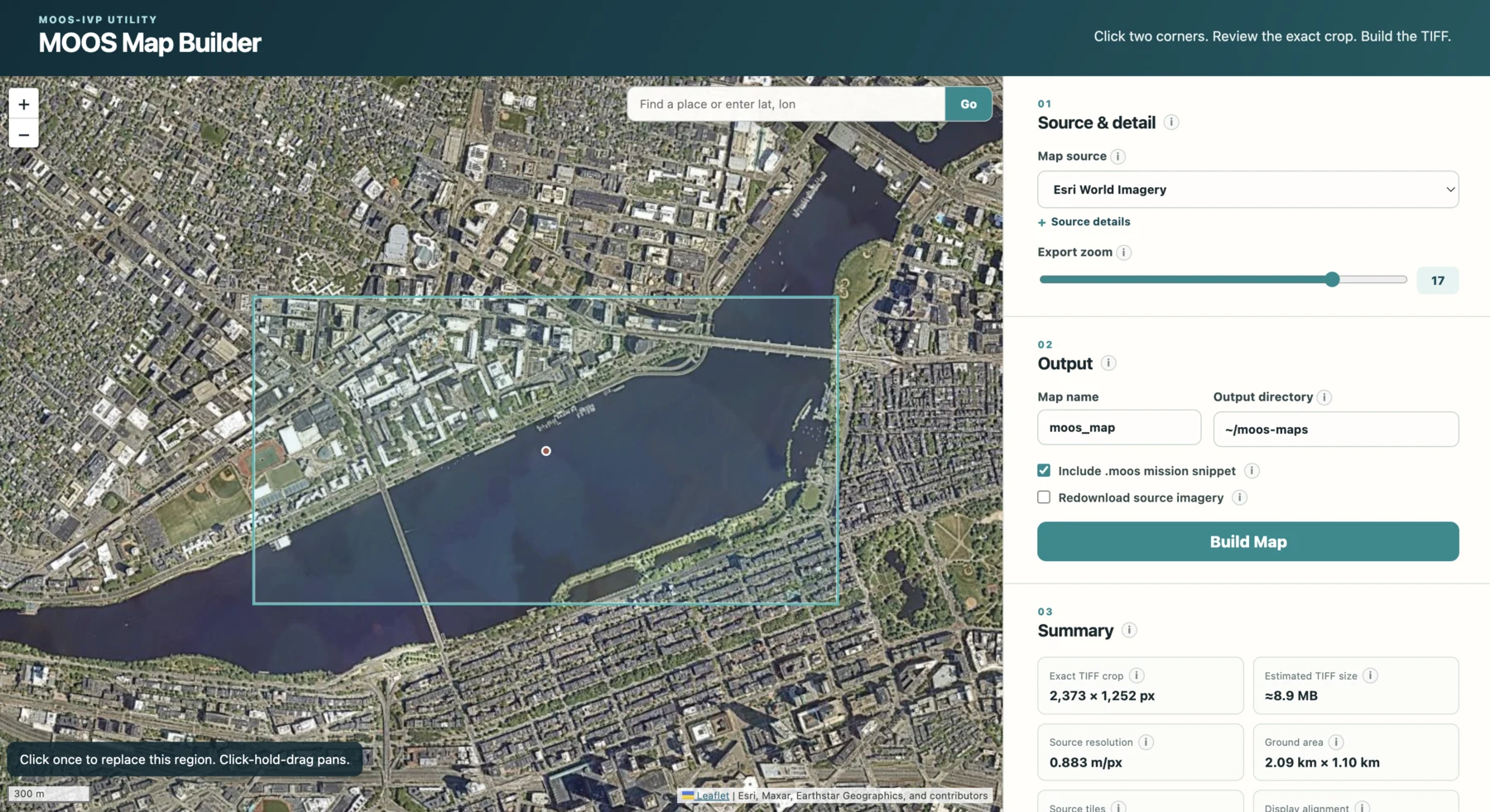
moos-map GUI supports visual crop selection, output review, and TIFF bundle creation in one workflow.Acknowledgements and evolution
MOOS Map grew out of earlier map-building work in the MOOS-IvP community. We are grateful to:
- HeroCC/AnaxiMap: HeroCC/AnaxiMap demonstrated a practical tile-download and stitching workflow that inspired MOOS Map’s map acquisition pipeline.
- Raymond Turrisi: His map-building prototype helped shape the practical workflow and direction of this project.
AnaxiMap already provided coordinate-driven XYZ tile acquisition and stitching,
source selection, downloaded-tile reuse, and initial .info generation. Ray’s
prototype already provided browser map navigation, two-click region selection,
adjustable bounds and origin, location search, live export estimates, imagery
selection, and TIFF export. MOOS Map independently implemented and extended
those foundations with:
-
Exact Geographic Cropping: Resamples the fractional source-tile window so the TIFF and its recorded bounds match the requested coordinates instead of retaining whole-tile margins.
-
pMarineViewer Metadata: Produces the strict six-key
.infoformat expected by currentpMarineViewer, including the mission datum. Ray’s prototype does not generate.info; AnaxiMap’s file includes additional active keys that currentpMarineViewerrejects. -
Complete Map Bundles: Places matching
.tif,.info, and optional copy-ready.moosfiles together in a named output directory. -
MOOS Geodesy Validation: Detects UTM-zone crossings, incompatible map/origin zones, invalid geographic bounds, and placement conditions that current MOOS geodesy cannot represent reliably.
-
Shared CLI and GUI Core: Uses the same source registry, crop calculations, cache, output writers, and validation from both interfaces, rather than maintaining separate build implementations.
-
Reproducible Planning: Extends AnaxiMap’s dry run and Ray’s live estimates with exact output dimensions, tile and pixel counts, resolution, ground size, selected bounds, mission origin, and modeled
pMarineViewerplacement. -
Post-Build Verification: Reopens completed TIFF and
.infofiles and verifies their dimensions, names, bounds, datum, syntax, and bundle consistency before reporting success. -
Reliable Tile Acquisition: Downloads concurrently, retries throttling and transient server errors, validates returned image data and dimensions, and rejects incomplete builds.
-
Source-Isolated Caching: Stores reusable tiles in provider-specific namespaces, preventing imagery from different services at the same coordinates from colliding.
-
Offline MBTiles Support: Builds maps directly from local MBTiles archives without contacting a hosted tile provider.
-
Source Policy Controls: Records attribution and provider metadata, distinguishes preview-only sources, and requires explicit acknowledgement before exporting from a custom XYZ service.
-
Bounded Builds: Enforces configurable tile-count, pixel-count, response-size, coordinate, and zoom limits before expensive or unsafe work begins.
-
Transaction-Safe Output: Builds and verifies files in staging, replaces existing bundles atomically, and restores prior files if installation or verification fails.
-
Automation Interfaces: Provides
sources,plan,build, andverifycommands with machine-readable JSON output for repeatable scripts and agent workflows. -
Improved Place Search: Extends Ray’s single-result, submit-only Nominatim search with autocomplete, multiple ranked results, duplicate removal, keyboard navigation, result-specific viewport fitting, server-side Photon requests, caching, and structured error handling.
-
Automated Tests: Covers geometry, acquisition, caching, source policy, bundle generation,
.infoparsing, CLI behavior, web endpoints, geocoding, and failure recovery. -
Viewer Validation: Documents a direct comparison with the shipped MIT
pMarineViewermap using matched local and geographic vehicle positions to validate TIFF alignment, datum handling, and mission placement.
Repo Builder
Full profileWorkflow, validation, support files, and related skills
Canonical source: skills/moos-ivp-repo-builder/
Definition
Repo Builder bootstraps a new external MOOS-IvP development repository from
moos-ivp/moos-ivp-extend. It validates the local MOOS-IvP dependency,
customizes the template for the user’s project, detaches the upstream Git
history, initializes an independent repository, writes a repo-local environment
file, and validates the baseline application and behavior build.
The result is a user-owned project with stable source, mission, binary, script,
and behavior-library locations. Normal ./build.sh runs can find the selected
MOOS-IvP checkout without depending on a permanently exported
MOOS_IVP_ROOT, while sourcing env.sh makes the project’s bin/, scripts/,
and lib/ available to MOOS launchers and pHelmIvP.
Workflow
Before creating files, the skill resolves and validates a MOOS-IvP checkout, then confirms the target path, repository name, project display author, whether examples should remain, and whether a specific shell profile should source the project environment. It refuses to overwrite an unexplained non-empty target.
The skill clones the template, removes its .git/, initializes main,
normalizes visible project text and README material, removes inherited template
CI configuration, and wires the resolved MOOS-IvP paths into top-level CMake.
It then creates idempotent environment setup, optionally adds one managed
profile block with permission, builds the retained examples, and initializes a
first commit only when Git identity is already available or explicitly
provided.
Template history
Earlier moos-ivp-extend copies in the moos-ivp and pavlab organizations
had drifted. Designing Repo Builder required comparing those variants and
settling on one universal template: the current
moos-ivp/moos-ivp-extend repository. New projects no longer inherit
organization-specific differences by accident.
Dependencies
The template’s default relative searches are insufficient when the extension
repository is not a sibling of moos-ivp. Repo Builder adds the resolved
MOOSCore build location to CMAKE_PREFIX_PATH and the checkout to the
MOOSIVP_SOURCE_TREE_BASE search so the dependency survives future shells and
normal builds.
Environment
The generated env.sh adds absolute project bin/ and scripts/ paths to
PATH and lib/ to IVP_BEHAVIOR_DIRS without duplicating entries on repeated
sourcing. Persistent shell integration remains optional and consists only of a
clearly marked profile block that sources this file.
Git and identity
The project display author used in README/CMake text is separate from Git commit identity. The skill does not rewrite upstream example authorship, invent a committer email, attach a remote, create automation, or push a repository unless those actions are requested.
Validation
The baseline build is run independently of shell-profile side effects. With
examples retained, success includes the generated pXRelayTest executable and
platform-appropriate libBHV_SimpleWaypoint shared library. Environment
validation separately confirms that sourcing env.sh exposes the project
paths.
Common faults
- A repository can build in one configured shell yet fail later if CMake relies
only on an exported
MOOS_IVP_ROOT. - The template’s
.git/must be removed before initializing the user’s independent history. - Project display authorship is not enough information to create a Git commit.
- Shell profiles can reset
PATHafter an inserted block or even hide basic build tools; the managed source block belongs near the end and is validated separately. - Retaining both legacy
READMEandREADME.mdcreates conflicting project documentation unless explicitly intended. - Generated
bin/andlib/output is validation evidence, not source to commit by default.
Template
moos-ivp/moos-ivp-extend
Provides the canonical build skeleton, example application, behavior library, and missions that make the initial build verifiable. Repo Builder customizes a clone rather than maintaining a second template copy inside the skill.
Template: https://github.com/moos-ivp/moos-ivp-extend
Related skills
- App and Behavior Builders: Once the repository is ready, they add user-owned software to it.
- Mission Builder: It creates scenarios that launch those applications and load those behavior libraries.
Installer
Full profileWorkflow, validation, support files, and related skills
Canonical source: skills/moos-ivp-installer/
Definition
Installer locates, clones, builds, and validates the upstream
moos-ivp/moos-ivp repository. It selects the checkout’s platform-specific
setup instructions, obtains approval before dependency or profile changes,
creates <moos-ivp-root>/env.sh, and runs a bundled validator against the
finished installation.
A completed installation has the expected ivp/src tree, executable MOOS and
IvP build scripts, a built pAntler, working application and behavior
generators, and an environment file that sets MOOS_IVP_ROOT and exposes the
checkout’s bin/ and scripts/ directories. This is the dependency layer used
by the repository, application, behavior, and mission workflows.
Workflow
The skill performs non-destructive discovery before cloning. It checks an explicit path, the current environment, and common checkout locations, then validates recognizable source and generator files. If no valid checkout exists, it confirms the install location, source URL, optional branch or tag, platform README, and shell-integration choice before making changes.
Installation follows README-OS-X.txt, README-GNULINUX.txt, or
README-WINDOWS.txt from the selected checkout rather than reproducing
dependency commands in the skill. Package-manager, sudo, and persistent
profile edits receive their own approval. After the upstream build, the skill
writes and tests env.sh, then optionally adds a managed source block to the
confirmed shell profile.
Upstream instructions
The checkout’s current platform README owns dependencies and build commands. This keeps the skill aligned with changes in upstream MOOS-IvP instead of maintaining a parallel installation recipe.
Environment
Core env.sh sets MOOS_IVP_ROOT and idempotently adds the core bin/ and
scripts/ directories to PATH. It deliberately does not set
IVP_BEHAVIOR_DIRS; user extension repositories own their own behavior-library
paths.
Validation
Early discovery checks only that a checkout has the expected source, build
scripts, and generators. Final validation additionally requires the platform
READMEs, built pAntler, env.sh, successful sourcing, the correct
MOOS_IVP_ROOT, and command discovery for pAntler,
GenMOOSApp_AppCasting, and GenBehavior.
Common faults
- Finding a source checkout does not prove the MOOS-IvP binaries have been built.
- Dependency commands should come from the selected checkout’s platform README, not a remembered package list.
- Writing
~or$HOMEintoenv.shmakes the installed location less explicit; the file uses resolved absolute paths. - Repeatedly sourcing a naïve environment file can accumulate duplicate PATH entries.
- Setting
IVP_BEHAVIOR_DIRSto the core checkout conflates upstream installation with user extension libraries. - Creating
env.shis normal checkout setup; editing a persistent shell profile is a separate, consent-gated action.
Source
moos-ivp/moos-ivp
Provides the upstream source, platform setup READMEs, build scripts, binaries, headers, libraries, and code generators. The skill does not bundle or fork the MOOS-IvP distribution.
Repository: https://github.com/moos-ivp/moos-ivp
Scripts
scripts/validate_moos_ivp_install.sh
Normalizes the checkout path and checks the source tree, platform READMEs,
build scripts, pAntler, both generators, and env.sh. It then sources the
environment in a clean Bash process and verifies both path contents and actual
command discovery, returning concise fail - ... diagnostics.
Related skills
- Repo Builder: It uses the validated checkout as the dependency for a new user-owned extension project.
- App and Behavior Builders: They use the installed generators, headers, libraries, and upstream examples.
- Mission Builder: It relies on the resulting executables and utilities to generate and run missions.
Designing the system
The main design decision was to give each skill one clear result to own. That does not mean a larger task stays inside one skill from beginning to end. It means the handoff should happen at a recognizable point, instead of allowing one workflow to slowly absorb the entire development process.
Boundaries, layers, and handoffs
Mission Builder should leave the user with an ordinary runnable mission. If that mission needs to evaluate itself, Eval Mission Builder adds grading without redefining the base mission. Harness Builder can then assume the self-evaluating mission works and concentrate on running it across multiple cases. This separation keeps testing machinery out of the normal mission workflow and makes it easier to tell which layer is responsible when something fails.
The same idea applies to supporting work. Mission Builder can consult MOOS-IvP Docs when a parameter is uncertain, then turn to ALog Analysis when a completed run needs investigation. Those responsibilities do not need to be copied into Mission Builder. The arrows in the architecture diagram represent these direct calls across a skill boundary.
Customizing a skill
Each bundled skill suggests a default approach, but it can also follow a reference or project style supplied in the request. That is often enough for a one-off change. A local skill becomes useful when the preference should apply every time, or when a project disagrees with one of the bundled defaults.
Repo Builder’s handling of PATH is a good example. By default, it writes a
repo-local env.sh and asks before adding a managed source block to a shell
profile. A project may instead have an established rule for where environment
setup belongs, or may prohibit profile edits entirely. Encoding that rule in a
local moos-ivp-repo-builder avoids explaining the same exception in every
request.
A local skill with the same unqualified name becomes the preferred workflow.
The bundled version remains available as
moos-ivp-skills:moos-ivp-repo-builder, so the original behavior can still be
requested explicitly.
For Codex, a repository-specific replacement normally lives at
.agents/skills/<skill-name>/SKILL.md; Claude Code uses
.claude/skills/<skill-name>/SKILL.md. The preference should be stated in the
skill description because that metadata is considered before the full
instructions are loaded. The local copy survives plugin updates, so its owner
should occasionally compare it with the current bundled skill. Full
instructions are in Customizing
Skills.
Developing and validating skills
The skills began as guidance distilled from practical MOOS-IvP work. That provides a useful starting point, but an author can easily supply assumptions that never made it into the text. Validation therefore asks two questions: does the generated artifact work, and can a fresh agent produce it from the skill alone?
The artifact is checked through the normal engineering evidence appropriate to the task. The skill is only validated when the agent reaches that working result without an expert filling in missing context or correcting key decisions.
Sandboxed agent evaluations
One way to test a skill is to treat the agent and its loaded guidance as a black box: give it a task, observe what it produces, and judge the result without coaching it through the workflow. A main agent creates a clean sandbox, gives a subagent access to the skill under test, and assigns a realistic task. When the subagent finishes, the main agent grades the artifact and returns the supporting evidence for manual review. Its report can also describe how the subagent approached the task and explain its key decisions, which helps show how the guidance was interpreted.
The task is written from the perspective of a normal user, not as a checklist that tells the subagent how to satisfy the skill. The subagent must interpret the request, use the material packaged with the skill, and decide what validation is needed. This makes the test sensitive to missing assumptions: instructions that look complete to their author may still lead a fresh agent to choose the wrong structure or stop after a weak validation step.
After a failed run, the author reviews the artifact and the evaluation report to decide whether the failure came from execution or from the guidance itself. If the skill allowed a reasonable but wrong interpretation, the author revises the relevant instructions and runs the task again with a fresh agent. The goal is not to coach the failed agent to the answer, but to make the next agent less likely to need that coaching.
Project feedback
These isolated tests are deliberately controlled, so they cannot reproduce the full life of a project. Real users work in repositories that do not match the original examples and return to the same code over longer periods. Their feedback reveals problems that an isolated test may never reach.
That feedback has been an important part of revising the skills. The projects in the next section are therefore not just examples of what the plugin has enabled; they are also part of how the guidance has been tested. The activity below shows the other half of that process: feedback led to revisions, and the revised guidance returned to testing and project use.
Development activity
These charts show how the plugin developed over the summer. Feedback from sandboxed evaluations and projects triggered waves of revisions, and the updated skills then returned to testing and use.
Commit totals are solely meant to provide context about the feedback/revision cycle.
92 commits across 22 active days · May 21–July 26, 2026 · default branch
How the skills evolved
Each row represents one skill. Large markers show when it entered the plugin, and smaller markers show later revisions. Only changes that affected how a skill worked are included.
Skills in practice
The following projects have already been enabled or accelerated by the skills. They have also served as real-world tests, providing feedback that informed later revisions to the guidance.
1. CI/CD pipeline
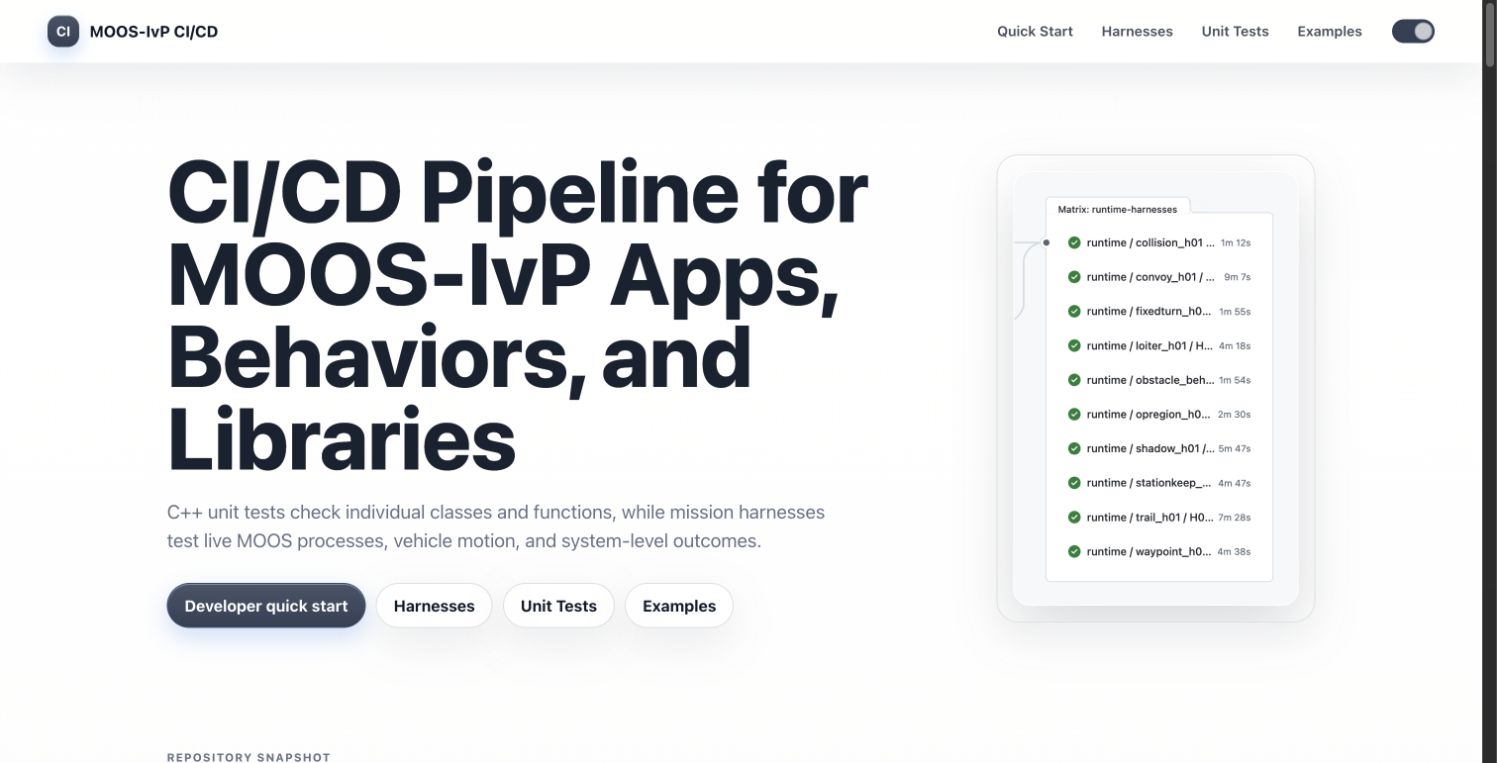
The MOOS-IvP CI/CD project provides local and automated regression testing against a MOOS-IvP checkout. It combines focused CTests with full mission harnesses and cross-platform build checks, giving developers a way to test both isolated logic and complete headless scenarios. The accompanying project site documents the test infrastructure and its results.
This has become one of the largest applications of the skills and will receive
its own presentation at MOOS-DAWG 2026. The test repository has already helped
validate and correct multiple pull requests to moos-ivp. Building it also
provided sustained feedback on the mission, evaluation, and harness workflows,
particularly the reliability of automated and parallel runs.
2. VS Code extension
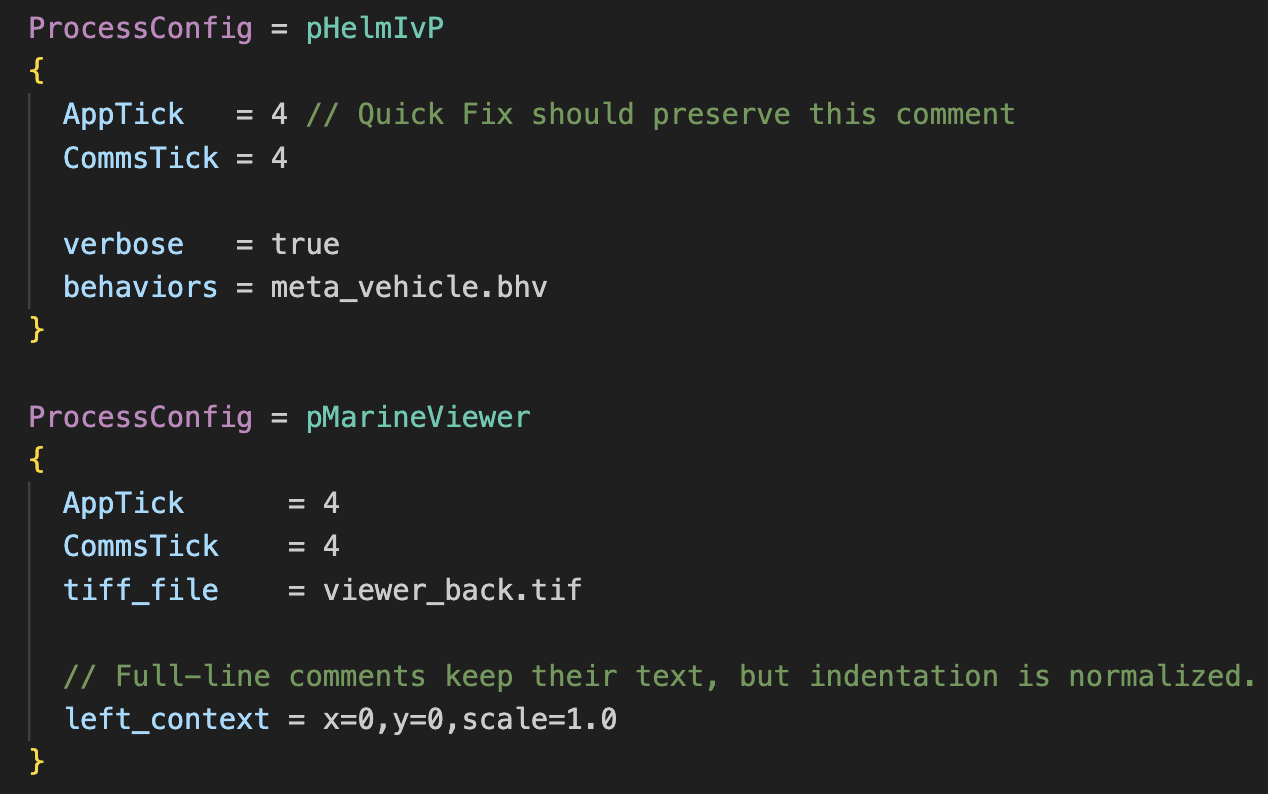
The MOOS-IvP Editor for Visual Studio Code began as a small syntax-highlighting extension. The summer 2026 revamp now provides semantic highlighting, hover documentation, folding, formatting, and conservative diagnostics for mission, behavior, and patch files. Its knowledge of applications, behaviors, and parameters is derived from the MOOS-IvP manuals and source tree rather than being limited to a generic text grammar.
The skills supported this expansion by making the same documentation-backed knowledge available during development. The project also tested whether MOOS-IvP guidance written for a coding agent could be turned into useful editor feedback for a human developer.
3. Master’s thesis work
Adam Phan used Harness Builder during master’s thesis work comparing a lightweight Java agent-based model with full-stack MOOS-IvP Monte Carlo simulation. The study asks when a fast simplified model can narrow a scenario’s parameter space and when the complete autonomy stack is needed to preserve the important behavior.
The harness skill reduced the work required to run the MOOS-IvP side of that comparison across repeated cases. Feedback from the thesis work, in turn, led to a more efficient default harness design.
4. PEARL
PEARL is an autonomous, solar-powered floating platform designed to support longer-range ocean operations. The current prototype acts as a smart environmental buoy, while the next-generation design expands that concept into a larger USV docking base for marine and aerial vehicles. The redesign adds power capacity, provisions for a quadcopter port, and a motion platform for repeatable docking and landing tests under simulated wave motion.
The skills were used throughout summer development to accelerate MOOS-IvP coding and mission work for the platform. This provided feedback from a long-running hardware project where software changes ultimately need to hold up outside simulation.
5. Coastal monitoring
The KONGSBERG Coastal Monitoring project is a student-led effort developing electric survey vehicles for coastal operations. Its recent work includes autonomous patrol and docking as well as coordinated missions across UAV, multiple USVs, and ROV platforms.
The skills were used to integrate another USV into the project’s existing MOOS environment, extending a single-vehicle mission into a swarm-style configuration. Feedback from that work was positive about the plugin’s setup, MOOS-IvP coding conventions, and attention to building and launching the system. That feedback has since been incorporated into the skills, particularly in how they balance build and launch checks with validation of the mission’s intended behavior.
6. MOOS-IvP-TA
The MOOS-IvP NotebookLM
TA
is a documentation-grounded teaching assistant for students working through
the MIT 2.680 labs. It is built from a curated collection of MOOS-IvP
documentation intended to answer conceptual and debugging questions with clear
source grounding. Its benchmark used representative student questions, with
moos-ivp-skills providing the verification workflow for checking technical
claims against the MOOS-IvP documentation and source code. The supporting
materials and evaluation results are preserved in the project
repository.
The TA and the skills serve different stages of the learning process. The TA helps a student understand MOOS-IvP without immediately generating the work for them. Once the student is ready to build applications and missions, the skills provide the more capable development workflow. That relationship was first tested directly in the Greece minicourse.
7. Greece minicourse
The MIT Marine Autonomy Laboratory taught a two-week minicourse in Athens based
on MIT 2.680. Its 24 participants ranged from civilians to officers and
captains from several branches of the Greek military. The course provided the
first classroom test of MOOS-IvP-TA, followed by optional access to the
moos-ivp-skills plugin during the second week.
More than ten students provided feedback on the two tools. Their responses supported the TA’s value as a teaching aid and the skills as a development tool students could graduate to. Several specifically cited the tools as helping them work within the course’s time constraints and spend more time learning. The Hellenic Naval Academy setting was documented by ERTNews, ANT1News, and a video from the Hellenic Naval Academy visit.
8. Headless mission debugging in missions-auto
missions-auto is a collection of
MOOS-IvP missions designed to run headlessly and under automation. Because the
repository is public-facing, its missions are also expected to serve as
high-quality examples.
The skills have been used across the repository to diagnose and improve a large number of those missions.
Project activity over time
The numbered lines match the project descriptions above and show when each was actively using the skills. The commit curve beneath them makes the overlap between real-world use and the plugin’s development visible.
Conclusion
The MOOS-IvP Skills plugin is not a replacement for MOOS-IvP expertise; it is a way to make that expertise reusable by coding agents. The ten skills available today provide concrete workflows for common development tasks while holding the resulting work to evidence an engineer can inspect. The projects described above show both the value and the limits of that approach: the skills can accelerate real work, but their guidance must continue to evolve through sandboxed evaluations and feedback from users. More skills are expected as the project matures, with the same goal throughout—to help agents produce MOOS-IvP software that engineers can understand, verify, and trust.